Choosing among sublimation printers for artists means balancing print size, color quality, running costs, and how easily each machine fits your creative workflow. The right model can turn digital artwork into vivid designs for apparel, gifts, signage, and hard goods.
This roundup compares 10 options across beginner-friendly bundles, compact desktop printers, wide-format models, and higher-volume systems. Use the guide below to narrow your choices by project size, budget, and expected production demands.
Best 10 Sublimation Printers for Artists Picks for 2026
Best Compact Pick

- Genuine Epson ink included
- Compact 8.5-inch format
- 150-sheet enclosed feed tray
Best For: Artists and small businesses with limited workspace
Best for Growing Shops

- SubliJet UHD CMYK inks included
- Software for design and color control
- Long prints up to 8.5 by 51 inches
Best For: Entrepreneurs scaling a sublimation product line
Best Wide-Format Alternative

- Handles paper up to 11 by 17 inches
- Prints, scans, copies, and faxes
- Refillable ink tank system
Best For: Artists needing wide-format multifunction printing
Best Starter Bundle

- Includes inks, paper, blanks, and tape
- Artspira app and design resources included
- Wi-Fi and Ethernet connectivity
Best For: Beginners starting apparel and hard-substrate projects
Wide-Format Photo Choice
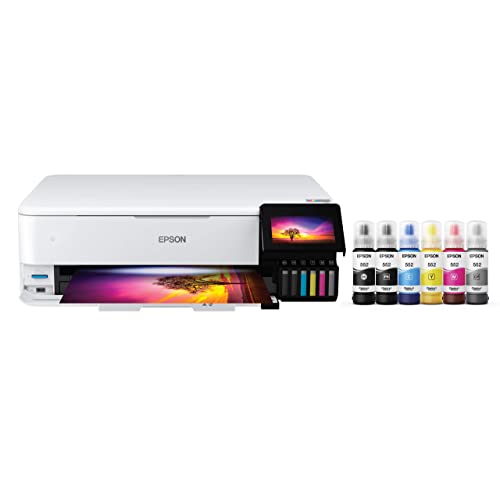
- Six-color refillable ink tank system
- Supports prints up to 13 by 19 inches
- Wireless all-in-one with scan and copy
Best For: Artists making wide-format photos, artwork, and graphics
Professional Compact Option
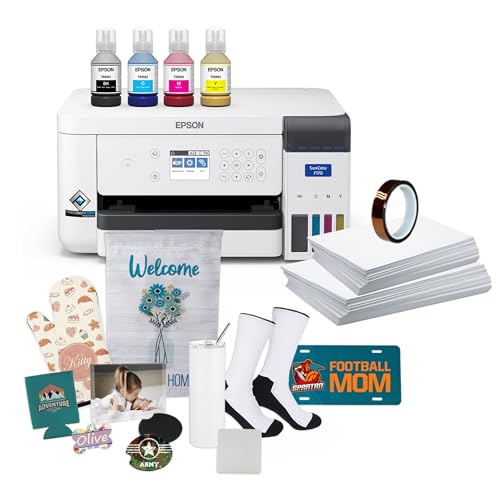
- Dedicated dye-sublimation printing system
- Includes OEM ink, paper, and thermal tape
- 150-sheet enclosed auto-feed tray
Best For: Small businesses and serious crafters making transfers
Best for Growing Studios

- Prints up to 11" x 17"
- Includes 31 mL CMYK inks and paper
- Automatic maintenance and business support
Best For: Artists and small businesses scaling sublimation products
Best for Production-Scale Artwork
Epson SureColor F570 with Stand
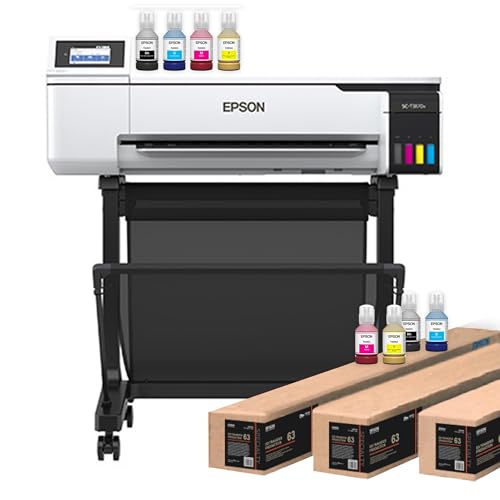
- Handles media up to 24" wide
- Includes two full ink sets and a stand
- Professional software, cutter, and remote install
Best For: Artists and print shops needing wide-format sublimation
Best Wide-Format Value Bundle

- Supports media up to 24" x 100'
- Includes professional Edge Print Pro software
- Comes with one full genuine ink set and remote install
Best For: Studios starting with wide-format sublimation
Best Compact Pick – Epson SureColor F170
The Epson SureColor F170 is a practical choice for artists seeking sublimation printers for artists that fit comfortably into a small workspace. It supports prints up to 8.5 inches wide, includes genuine Epson sublimation ink, and offers USB, Ethernet, and wireless connectivity for Windows and macOS setups.
Best For: Hobbyists, crafters, and small businesses making apparel, mugs, mousepads, and other sublimation projects.
Pros:
- Includes a full set of genuine Epson sublimation inks.
- PrecisionCore printhead supports detailed, clear image output.
- Compact design with a 150-sheet enclosed auto-feed tray.
- Supports wireless, USB, and Ethernet connections.
Cons:
- Maximum media width is limited to 8.5 inches.
- Mobile-device connection is not supported.
The F170 stands out as a straightforward, space-saving option for artists who prioritize dependable Epson support and clean, repeatable desktop sublimation transfers over larger print sizes.
Best for Growing Shops – Sawgrass SG500
The Sawgrass SG500 is designed for artists and entrepreneurs who want sublimation printers for artists with guided software and room for expanding projects. It prints up to 8.5 by 14 inches normally, with the bypass tray supporting prints up to 8.5 by 51 inches, and includes SubliJet UHD CMYK inks plus paper.
Best For: Home-based entrepreneurs and small businesses producing apparel, drinkware, signage, and promotional products.
Pros:
- Includes a full set of SubliJet UHD CMYK inks and paper.
- MySawgrass and Sawgrass Print Utility support design and color-control workflows.
- Bypass tray accommodates long prints up to 8.5 by 51 inches.
- Wi-Fi connectivity and printhead auto-maintenance add convenience.
Cons:
- Uses standard 110/120V US and North American outlets.
- Standard tray media is limited to 8.5 by 14 inches.
With its software ecosystem, included supplies, and long-print bypass capability, the SG500 is a strong fit for creators who want an accessible desktop setup that can support a growing product range.
Best Wide-Format Alternative – Epson EcoTank ET-15000
The Epson EcoTank ET-15000 is a wide-format all-in-one inkjet that can appeal to artists comparing sublimation printers for artists, particularly when scanning, copying, and larger paper handling also matter. It supports media up to 11 by 17 inches, includes refillable ink tanks, and offers Wi-Fi, Ethernet, and USB connectivity.
Best For: Artists who need wide-format paper handling alongside printing, scanning, copying, and faxing.
Pros:
- Supports media up to 11 by 17 inches.
- Combines printing, scanning, copying, and faxing.
- Refillable EcoTank design includes starter ink bottles.
- Offers auto-duplex printing and a 250-sheet capacity.
Cons:
- It is an inkjet all-in-one rather than a dedicated dye-sublimation printer.
- Its larger dimensions and 26.5-pound weight require more workspace.
The ET-15000 is best considered a versatile wide-format platform rather than a purpose-built sublimation machine. Confirm ink and workflow requirements before selecting it for sublimation production.
Best Starter Bundle – Brother SP-1
The Brother SP-1 Starter Bundle is a convenient entry point for artists shopping for sublimation printers for artists because it combines the printer with inks, transfer paper, blanks, heat-resistant tape, and design resources. It supports Wi-Fi and Ethernet connections and works with Windows, Mac, and the Artspira app.
Best For: New crafters, artists, and small businesses wanting supplies and project materials in one package.
Pros:
- Includes full CMYK ink set, 160 transfer sheets, and 50 sublimation blanks.
- Provides four rolls of heat-resistant tape in multiple widths.
- Includes Artspira software, 100 designs, and commercial-use design resources.
- Supports Wi-Fi, Ethernet, Windows, Mac, and app-based workflows.
Cons:
- Maximum print size is limited to legal-width media.
- 600 by 600 dpi resolution is lower than some listed alternatives.
The SP-1 bundle offers especially good convenience for beginners: the included blanks and consumables make it easier to start testing designs immediately without assembling a separate supply kit.
Wide-Format Photo Choice – Epson EcoTank ET-8550
For artists comparing sublimation printers for artists, the Epson EcoTank Photo ET-8550 is better understood as a versatile wide-format inkjet for producing artwork, graphics, and photo-quality prints. Its refillable six-color ink system, 13-by-19-inch media support, and built-in scanning and copying make it a flexible studio or home creative printer, though the supplied specifications do not identify it as a dye-sublimation printer.
Best For: Artists who need high-quality wide-format artwork, photos, and creative projects in addition to scanning and copying.
Pros:
- Prints up to 13 by 19 inches and supports a wide range of paper sizes.
- Six-color Claria ET Premium ink system is designed for vibrant colors and sharp text.
- Refillable tanks and included ink supply can reduce replacement frequency and cartridge waste.
- Includes wireless printing, scanning, copying, and automatic duplexing.
Cons:
- It is listed as an inkjet printer, not a dedicated dye-sublimation printer.
- Its larger 24.5-pound design may require more workspace.
- Uses glossy photo paper as the listed print medium, so transfer-material compatibility should be verified separately.
The ET-8550 is a strong option when an artist values detailed, oversized photo and art prints plus low-maintenance tank refilling. Choose a purpose-built sublimation model instead if heat-transfer workflows are the priority.
App-Driven Craft Pick – Brother SP-1 Sublimation Printer
The Brother SP-1 is a purpose-built choice among sublimation printers for artists who want a straightforward phone- or tablet-based design workflow. Through the Artspira app, you can import designs, access more than 100 sublimation designs, print onto sublimation paper, and heat-press transfers onto suitable polyester-coated items.
Best For: Crafters and artists creating custom shirts, mugs, tumblers, bags, hats, and other small sublimation projects with mobile devices.
Pros:
- Designed specifically for dye-sublimation printing.
- Artspira supports imported images, saved designs, and ready-made creative content.
- Includes Brother genuine cyan, magenta, yellow, and black sublimation ink plus starter paper.
- Wi-Fi connectivity and a compact 7.9-pound build support flexible placement.
Cons:
- A heat press is required and must be purchased separately.
- The listed maximum media size is 8.5 by 11 inches.
- The current workflow is app-focused; the desktop version is noted as coming soon.
The SP-1 is the most directly aligned option here for artists who want an accessible sublimation workflow and mobile design tools. Its smaller paper size and separate heat-press requirement make it better suited to custom craft projects than large-format production.
Professional Compact Option – Epson SureColor F170
The Epson SureColor F170 is a compact dye-sublimation printer for artists, hobbyists, crafters, and small businesses that want a more production-oriented transfer setup. It includes OEM sublimation ink, starter paper in two sizes, thermal tape, and a 150-sheet enclosed auto-feed tray, while supporting Windows and macOS through USB, wireless, or Ethernet connections.
Best For: Small businesses and serious crafters producing sublimation transfers for textiles, apparel, mugs, mousepads, and similar blanks.
Pros:
- Purpose-built dye-sublimation printer with Epson PrecisionCore printhead technology.
- Includes a full set of OEM sublimation inks, starter blanks, two paper sizes, and thermal tape.
- 150-sheet enclosed auto-feed tray helps streamline repeated printing and reduce paper exposure.
- Compact design supports Windows and macOS connectivity through wireless, USB, and Ethernet.
Cons:
- Mobile-device connectivity is not supported.
- Maximum media width is listed as 8.5 inches.
- It is a print-only model without scanning or copying functions.
The F170 offers the most complete out-of-the-box sublimation package in this selection, especially for users who value OEM ink and a closed paper tray. Its computer-only workflow and 8.5-inch media limit are the main tradeoffs for artists seeking mobile control or larger prints.
Best for Growing Studios – Sawgrass SG1000
The Sawgrass SG1000 is a strong fit for artists seeking sublimation printers for artists that can handle larger designs and expanding product lines. It prints up to 11″ x 17″ out of the box and includes SubliJet UHD inks, paper, workflow software, and business-oriented support.
Best For: Artists, makers, and small businesses producing apparel, mugs, banners, panels, signage, and promotional items.
Pros:
- Supports prints up to 11″ x 17″ for larger artwork and product applications.
- Includes 31 mL CMYK SubliJet UHD inks and paper.
- Automatic maintenance helps reduce concerns about clogged print heads during periods of inactivity.
- Includes MySawgrass, Sawgrass Print Utility, onboarding, a two-year printer and ink warranty, and lifetime education and support.
Cons:
- Its maximum listed media size is smaller than the 24-inch width supported by the Epson options.
- Designed for standard 110/120V US and North American electrical outlets.
The SG1000 balances artist-friendly workflow tools with the capacity needed for a growing sublimation operation. Choose it when 11-by-17-inch output is sufficient and automatic maintenance and included support are priorities.
Best for Production-Scale Artwork – Epson SureColor F570 with Stand
For artists comparing sublimation printers for artists with wider media needs, this Epson SureColor F570 bundle supports rolls and sheets up to 24 inches wide. It combines two full ink sets, a stand, a cutter, professional software, and remote installation for a more production-oriented setup.
Best For: Artists and professional print shops creating wide-format polyester fabric and coated-ceramic projects.
Pros:
- Accommodates media up to 24″ wide and up to 100 feet long.
- Includes a 50-sheet auto-feed tray and built-in cutter.
- PrecisionCore MicroTFP printhead includes Precision Droplet Control and Nozzle Verification Technology.
- Includes two full ink sets, Epson Edge Print Pro, a stand, remote installation, and support.
Cons:
- At 200 pounds, it is substantially heavier and less compact than a typical desktop printer.
- The listed color and black-and-white speeds are 1 page per minute.
- Its wide-format setup requires more workspace than smaller sublimation printers.
This bundle is aimed at artists who need width, roll handling, and professional layout controls rather than a lightweight craft-room printer. The included stand, extra ink set, and remote installation add useful value for a more demanding workflow.
Best Wide-Format Value Bundle – Epson SureColor F570
This Epson SureColor F570 bundle is worth considering for artists looking at sublimation printers for artists that support wide designs without adding a second ink set. It handles rolls and sheets up to 24 inches wide and includes genuine ink, professional software, remote installation, and technical support.
Best For: Artists and studios that need 24-inch sublimation capability and want a streamlined starter bundle.
Pros:
- Supports media up to 24″ x 100′ with a 50-sheet capacity.
- Includes PrecisionCore MicroTFP technology, Precision Droplet Control, and Nozzle Verification Technology.
- Epson Edge Print Pro provides layout, nesting, pattern-repeat, and color-control tools.
- Includes a full genuine ink set, user guide, remote installation, and free technical support.
Cons:
- Includes one full ink set rather than the two included with the other F570 bundle.
- The listed output speed is 1 page per minute for both color and black-and-white printing.
- Its 151-pound weight and 32″ x 38″ footprint require dedicated space.
The F570 offers the same broad media support and professional software focus as a production-oriented sublimation system. Select this version when one included ink set meets your initial needs and wide-format capability matters more than compactness.
How We Picked the Best Sublimation Printers for Artists
We focused on models that suit artwork-driven sublimation workflows, including dedicated dye-sublimation printers and compatible tank-based systems commonly used for heat-transfer projects. Our comparison considers maximum paper size, included supplies, ink availability, wireless connectivity, setup requirements, and the practical needs of artists creating apparel, mugs, décor, and other personalized products.
Bundles receive attention because included ink, transfer paper, blanks, tape, and setup support can significantly change the value of a printer. We also separated compact machines from wide-format options so you can compare products within a realistic creative and production category.
Quick Comparison
| Best For | What to Prioritize | Models to Consider |
|---|---|---|
| Beginners and small workspaces | Simple setup, compact footprint, starter supplies | Epson SureColor F170, Brother SP-1, Sawgrass SG500 |
| General creative projects | Flexible media handling and economical ink capacity | Epson EcoTank ET-15000, Epson EcoTank Photo ET-8550 |
| Larger artwork and products | Wide-format support and higher throughput | Sawgrass SG1000, Epson SureColor F570 |
| Ready-to-use bundles | Full ink sets, paper, blanks, or installation support | Brother SP-1, F170 and F570 bundles |
Key Buying Factors for Sublimation Printers for Artists
Print Size and Project Dimensions
Check the printer’s maximum paper size before buying. Letter-size models work well for shirts, mugs, small signs, and samples, while wide-format printers are better for larger apparel graphics, panels, banners, and oversized artwork. A larger printer usually needs more desk or studio space.
Ink System and Operating Cost
Dedicated sublimation printers are designed for compatible dye-sublimation ink, while some EcoTank models require careful conversion and should be used only according to the manufacturer’s guidance. Compare replacement ink prices, included capacity, and expected print volume rather than judging value by the upfront price alone.
Color Workflow and Connectivity
Artists should look for dependable color-management options, suitable driver support, and wireless or USB connectivity that works with their design setup. Strong color consistency matters when reproducing illustrations, gradients, branded artwork, and repeat orders.
Included Accessories and Support
A bundle containing transfer paper, heat-resistant tape, blanks, spare ink, or remote installation can reduce setup friction. Confirm exactly what is included, since similarly named packages may contain different quantities or accessories.
Who Should Buy Which Sublimation Printers for Artists?
Choose a compact Epson SureColor F170, Brother SP-1, or Sawgrass SG500 if you are starting out, have limited space, or mostly create small-format products. Their included supplies can make initial testing easier.
Consider an EcoTank ET-15000 or ET-8550 if you want a versatile wide-format platform for creative work and are comfortable verifying sublimation compatibility and setup requirements. These are especially appealing to artists who also need broader all-in-one printing capabilities.
Move up to the Sawgrass SG1000 or Epson SureColor F570 when larger artwork, faster production, or a more dedicated studio workflow justifies the investment. The F570 bundles are particularly worth comparing if installation help and extra supplies matter to your launch plan.