The best sublimation printers for crafts make it easier to create personalized shirts, mugs, tumblers, signs, gifts, and other heat-transfer projects at home. The right choice depends on more than print quality: ink costs, supported materials, setup, size, and included accessories all affect the overall value.
This roundup compares 10 options across Epson, Sawgrass, Brother, Pinckney, and Liene, including dedicated sublimation printers, converted-style tank systems, and convenient bundle options for beginners.
Best 10 Sublimation Printers for Crafts Picks for 2026
Best Compact Epson Pick

- Purpose-built dye-sublimation printer
- Includes genuine Epson ink
- 150-sheet enclosed paper tray
Best For: Compact home studios and small businesses
Best for Growing Shops

- Includes SubliJet UHD CMYK inks
- Supports long prints via bypass tray
- Comes with design and print software
Best For: Home-based entrepreneurs and growing craft businesses
Best Wide-Format All-in-One

- Prints up to 11 by 17 inches
- Includes scan, copy, and fax functions
- Uses a refillable EcoTank system
Best For: Crafters needing office versatility and wide-format printing
Best Starter Bundle

- Includes ink, paper, blanks, and tape
- Comes with design software and resources
- Supports Wi-Fi, Ethernet, and apps
Best For: Beginners starting apparel and gift projects
Best Budget-Friendly Option

- Refillable tanks with included ink
- Prints, scans, and copies
- Wi-Fi and mobile connectivity
Best For: General home printing alongside basic craft projects
Best for Growing Craft Businesses
Epson SureColor F170 Dye-Sublimation Printer
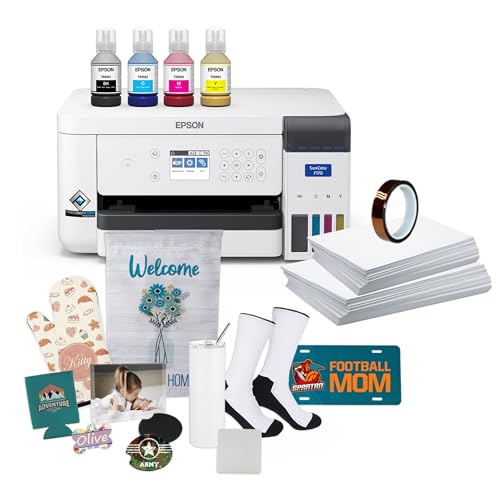
- PrecisionCore dye-sublimation printing
- Includes ink, paper, blanks, and tape
- 150-sheet enclosed auto-feed tray
Best For: Desktop-based crafting and small-business production
Best All-in-One Value
Pinckney Super-Tank Sublimation Printer

- Cartridge-free tank design with included sublimation ink
- Built-in scanner and copier
- Wi-Fi connectivity and broad paper-size support
Best For: Home crafters needing sublimation, scanning, and copying
Best for Stickers

- Prints and cuts stickers in one device
- AI-assisted image extraction and precision cutting
- Includes 180 sheets of photo and sticker paper
Best For: Custom stickers, labels, photos, and creative gifts
Best Complete Craft Bundle

- Full CMYK ink set included
- 310 transfer sheets and 50 blanks included
- Adds tape, tools, designs, and Artspira software
Best For: Hobbyists and small businesses starting personalized projects
Best Compact Epson Pick – SureColor F170
For crafters seeking sublimation printers for crafts, the Epson SureColor F170 is a compact, purpose-built option for producing color transfers on items such as apparel, mugs, mousepads, and other compatible blanks. Its enclosed paper tray, included OEM inks, and support for Windows and macOS make it practical for home studios and small businesses.
Best For: Hobbyists, crafters, and small-business owners who want a compact Epson dye-sublimation printer with included genuine ink and flexible connectivity.
Pros:
- Includes a full set of genuine Epson sublimation inks and Epson documentation.
- PrecisionCore printhead with Precision Droplet Control is designed for clear, detailed images.
- 150-sheet enclosed auto-feed tray helps reduce dust exposure and paper preparation.
- Supports wireless, USB, and Ethernet connections on Windows and macOS.
Cons:
- Maximum media width is 8.5 inches, limiting larger-format projects.
- Mobile-device connection is not supported.
- Print-only design does not include scanning or copying.
The F170 is a focused choice when reliable, compact sublimation printing matters more than multifunction features or oversized output. Its included ink and closed paper tray add convenience for regular crafting workflows.
Best for Growing Shops – Sawgrass SG500
The Sawgrass SG500 is a strong contender among sublimation printers for crafts when vivid color, guided software, and room for business growth are priorities. It prints up to 8.5 by 14 inches through its standard setup, with a bypass tray supporting longer prints up to 8.5 by 51 inches.
Best For: Home-based entrepreneurs and crafters making apparel, drinkware, signage, and promotional products who want integrated design and print tools.
Pros:
- Includes a full CMYK SubliJet UHD ink set and paper bundle.
- MySawgrass and Sawgrass Print Utility provide templates, presets, and color-control tools.
- Wi-Fi connectivity and printhead auto-maintenance support convenient ongoing use.
- Bypass tray accommodates long media up to 8.5 by 51 inches.
Cons:
- Standard media size tops out at 8.5 by 14 inches without using the bypass tray.
- Designed for 110/120V US and North American electrical outlets.
- Its 100-sheet capacity is smaller than some craft-focused alternatives.
With its included software ecosystem and long-media capability, the SG500 is well suited to makers who are moving beyond occasional projects. It offers a more business-oriented workflow while retaining a desktop-friendly footprint.
Best Wide-Format All-in-One – EcoTank ET-15000
The Epson EcoTank ET-15000 can suit crafters comparing sublimation printers for crafts who also need a versatile everyday office machine. It is an inkjet all-in-one with printing, scanning, copying, and faxing, plus support for media up to 11 by 17 inches; however, the supplied notes identify sublimation as a supported use rather than its primary printer type.
Best For: Crafters who want wide-format capability and multifunction office features alongside potential sublimation use.
Pros:
- Supports media up to 11 by 17 inches for larger designs.
- Combines printing, scanning, copying, and faxing in one unit.
- Refillable EcoTank system includes high-volume ink bottles.
- Offers Wi-Fi, Ethernet, USB, automatic duplexing, and a 250-sheet capacity.
Cons:
- It is an inkjet all-in-one, not a dedicated dye-sublimation printer.
- Its 29.6-inch depth and 26.5-pound weight require substantial workspace.
- Supplied notes do not include sublimation-specific transfer ink or paper.
The ET-15000 is best considered a versatile wide-format inkjet that may support sublimation-related workflows, rather than a straightforward dedicated sublimation solution. Choose it when scanning, copying, faxing, and larger paper sizes are as important as craft printing.
Best Starter Bundle – Brother SP-1
The Brother SP-1 stands out among sublimation printers for crafts because its starter bundle includes much of the material needed to begin: CMYK ink, transfer paper, blanks, heat-resistant tape, and design resources. Wi-Fi, Ethernet, Windows, Mac, and app compatibility also make it approachable for hobbyists and new small businesses.
Best For: Beginners and crafters who want a dye-sublimation printer packaged with supplies for apparel, mugs, tumblers, coasters, and other projects.
Pros:
- Bundle includes full 47 ml CMYK ink bottles, 160 transfer sheets, and 50 sublimation blanks.
- Includes multiple rolls of heat-resistant tape for project setup.
- Artspira software, 100 designs, and additional design resources support beginners.
- Offers Wi-Fi and Ethernet connectivity with Windows, Mac, and app compatibility.
Cons:
- 600 by 600 dpi resolution is lower than some competing models.
- Maximum media size is 8.5 by 14 inches.
- Print-only design does not provide scanning or copying.
The SP-1 is especially appealing when convenience and initial supplies matter more than maximum resolution. Its extensive bundle can reduce the number of separate purchases needed to start making sublimation projects.
Best Budget-Friendly Option – Epson EcoTank ET-2800
The Epson EcoTank ET-2800 is not a purpose-built sublimation printer, but its refillable ink-tank design may appeal to crafters who also need an everyday color printer. It supports plain paper, glossy photo paper, envelopes, and custom media sizes up to 8.5 by 47.2 inches, making it a flexible home-office option. For actual sublimation projects, verify ink and workflow compatibility before buying.
Best For: Crafters who want an economical all-in-one printer for general home printing and occasional craft-related media work.
Pros:
- Cartridge-free EcoTank system includes up to two years of ink.
- Combines color printing, scanning, and copying in one compact unit.
- Offers Wi-Fi, USB, and mobile printing connectivity.
- Supports custom media sizes and glossy photo paper.
Cons:
- It is an inkjet printer rather than a dedicated dye-sublimation printer.
- Manual duplex printing and a 100-sheet input capacity may slow larger jobs.
- Color output is rated at up to 5 pages per minute.
The ET-2800 makes the most sense when low-cost everyday printing matters as much as crafting. Dedicated sublimation users should consider a purpose-built model instead, while beginners seeking a general home printer may appreciate its refillable tanks and multifunction design.
Best App-Connected Craft Printer – Brother SP1 Sublimation Printer
The Brother SP1 is a dedicated dye-sublimation printer designed for DIY projects such as shirts, mugs, tumblers, bags, and hats. Its Artspira app lets you import and save designs, access more than 100 sublimation designs, and send projects from a phone or tablet. A heat press is required separately, so factor that equipment into the total setup cost.
Best For: Crafters who want a purpose-built sublimation printer with a mobile-first design workflow.
Pros:
- Designed specifically for dye-sublimation craft projects.
- Works with the Artspira app and includes access to sublimation designs.
- Supports projects involving polyester-coated items and fabric applications.
- Includes Brother genuine cyan, magenta, yellow, and black sublimation ink plus starter paper.
Cons:
- A heat press is required and must be purchased separately.
- The listed workflow is centered on iOS and mobile devices; the desktop version is noted as forthcoming.
- Maximum media size is 8.5 by 11 inches.
The SP1 is a straightforward choice among sublimation printers for crafts when app-based creation and ready-to-use project ideas are priorities. Its included ink and starter paper help begin quickly, but users should confirm device compatibility and budget for a heat press.
Best for Growing Craft Businesses – Epson SureColor F170 Dye-Sublimation Printer
The Epson SureColor F170 is a dedicated dye-sublimation printer with a compact footprint, PrecisionCore printhead, and included sublimation supplies. Its 150-sheet enclosed auto-feed tray supports more efficient production, while the bundle includes a full set of Epson ink, two paper sizes, starter blanks, and thermal tape. It connects through Wi-Fi, USB, or Ethernet, but mobile-device printing is not supported.
Best For: Hobbyists, serious crafters, and small businesses that need a dedicated sublimation setup with bundled supplies and flexible connectivity.
Pros:
- Purpose-built dye-sublimation printer with PrecisionCore printhead technology.
- Includes OEM Epson ink, sublimation paper, starter blanks, and thermal tape.
- 150-sheet dust-resistant auto-feed tray helps support longer print runs.
- Offers Wi-Fi, USB, and Ethernet connections for Mac and Windows setups.
Cons:
- Mobile-device printing is not supported.
- Maximum media width is 8.5 inches.
- Print-only design does not include scanning or copying functions.
The F170 is one of the more complete sublimation printers for crafts for users who want a dedicated, ready-to-run system. Its bundled materials and larger paper tray suit repeat projects, while the lack of mobile support makes it better for desktop-based workflows.
Best All-in-One Value – Pinckney Super-Tank Sublimation Printer
For crafters seeking sublimation printers for crafts with scanning and copying built in, the Pinckney Super-Tank model offers a practical all-in-one setup. Its cartridge-free design includes sublimation ink, wireless connectivity, and support for several paper sizes.
Best For: Home crafters who want sublimation printing plus everyday scanning and copying.
Pros:
- Includes high-capacity sublimation ink tanks with 127mL of black ink and 85mL each of cyan, magenta, and yellow.
- Built-in scanner and copier add versatility beyond transfer printing.
- Auto-fill nozzles are designed to simplify refilling without syringes or squeezing.
- Supports Wi-Fi, USB, and multiple paper sizes, including letter and legal formats.
Cons:
- It is a simplex printer, so double-sided printing is not automatic.
- The printer is relatively bulky at 15.3 pounds and includes a single tray.
- Printed sublimation colors may look dull on paper before heat transfer.
With its included ink and multifunction design, this Pinckney model is a convenient starting point for craft rooms that also need an everyday document printer. Buyers should plan for basic nozzle checks and print-head alignment if quality issues occur.
Best for Stickers – Liene PixCut S1 Inspire Kit
The Liene PixCut S1 stands apart from conventional sublimation printers for crafts by combining thermal dye-sublimation printing with automated cutting. Its app-based workflow lets crafters edit, print, and cut stickers or labels from a smartphone, tablet, or desktop.
Best For: Crafters focused on custom stickers, labels, photo projects, and small creative gifts.
Pros:
- Prints and cuts in one workflow, reducing the need for separate machines.
- AI image extraction helps identify subjects and guide precision cutting.
- Four-layer thermal dye-sublimation printing automatically laminates stickers for waterproof and scratch-resistant results.
- Inspire Kit includes 36 photo sheets and 144 sticker sheets.
Cons:
- Its 300 dpi thermal printing is intended for photos, stickers, and labels rather than broad-format transfer projects.
- Bluetooth and the Liene app are central to the editing and cutting workflow.
- The supplied notes do not indicate support for fabric, mugs, shirts, or other heat-transfer blanks.
This is a specialized craft printer rather than a general-purpose sublimation-transfer machine. Its strongest advantage is convenience: the integrated cutter, durable laminated output, and generous starter paper bundle make sticker production straightforward.
Best Complete Craft Bundle – Brother SP-1 Deluxe Kit
For crafters who want sublimation printers for crafts with supplies ready to use, the Brother SP-1 Deluxe Bundle provides more than the printer alone. It combines a full CMYK ink set with transfer paper, blanks, heat-resistant tape, tools, designs, and access to Artspira software.
Best For: Hobbyists, personalized-project creators, and small businesses making shirts, totes, mugs, tumblers, coasters, and similar items.
Pros:
- Includes the Brother SP-1 printer, 47mL each of cyan, magenta, yellow, and black sublimation ink.
- Comes with 310 transfer sheets, 50 sublimation blanks, heat-resistant tape, and a seven-piece tool set.
- Supports Wi-Fi and Ethernet connectivity and works with Windows, Mac, and the Artspira app.
- Handles media up to legal size and offers a listed 10 color-pages-per-minute speed.
Cons:
- The printer itself is print-only and does not include scanning or copying functions.
- The bundle may be more supplies than casual crafters need initially.
- It uses simplex printing rather than automatic duplex printing.
This bundle is especially appealing when the goal is to start making finished sublimation projects immediately. The included blanks, paper, tape, tools, and design resources reduce the need for separate initial purchases, while Wi-Fi and Ethernet provide flexible setup options.
How We Picked the Best Sublimation Printers for Crafts
We focused on models and bundles suited to practical craft use, weighing print format, color performance, ease of setup, included supplies, connectivity, and long-term operating costs. Dedicated systems such as the Epson SureColor F170, Sawgrass SG500, and Brother SP-1 are designed specifically for sublimation, while compatible tank-style printers may appeal to shoppers seeking lower upfront ink costs or multifunction features.
We also considered whether each option fits a beginner workflow. Bundles that include transfer paper, blanks, heat tape, or a full ink set can reduce the number of separate purchases required to start making projects.
Quick Comparison
| Best For | What to Look For |
|---|---|
| Beginners | Starter bundles, clear setup instructions, and included consumables |
| Small craft spaces | Compact footprint and standard letter-size printing |
| Frequent projects | Reliable ink availability, efficient tanks, and easy maintenance |
| Larger designs | Wide-format support and compatible transfer paper sizes |
| Multifunction use | Scanning, copying, and conventional color-printing capability |
Key Buying Factors for Sublimation Printers for Crafts
Print Size and Project Type
Standard 8.5-by-11-inch printing is sufficient for many shirts, mugs, ornaments, and small signs. Choose a wide-format model if you expect to make larger apparel designs, all-over transfers, or oversized craft projects.
Ink System and Running Costs
Check whether the printer uses dedicated sublimation ink, proprietary cartridges, refillable tanks, or a bundled supply system. Compare replacement ink prices and availability before buying. A low purchase price may not be economical if consumables are expensive or difficult to find.
Included Supplies and Software
Paper, blanks, heat tape, and a full ink set add useful value, especially for first-time users. Also verify supported operating systems, wireless connectivity, color-management tools, and whether design software or profiles are included.
Maintenance and Workflow
Sublimation printers need regular use and proper maintenance to help prevent ink-flow problems. Look for accessible support, straightforward cleaning procedures, and a workflow that matches how often you plan to print.
Who Should Buy Which Sublimation Printers for Crafts?
Choose a compact dedicated model such as the Epson F170 or Sawgrass SG500 if you want dependable sublimation printing in a small workspace. Brother SP-1 bundles are appealing for beginners who want supplies included from the start, with deluxe versions offering more paper and blanks.
Consider an Epson EcoTank or similar tank-style option if you need a multifunction printer or prioritize refillable-ink economics, but confirm compatibility and sublimation requirements before purchase. The wide-format Epson ET-15000 is better suited to shoppers who also need larger conventional prints. Finally, the Liene PixCut S1 is aimed at smaller, photo-oriented sticker and craft projects rather than replacing a full-size apparel sublimation setup.