Preserving a family archive takes more than choosing the scanner with the highest resolution. The right model should match your collection’s photo sizes, condition, volume, and desired workflow.
These 10 scanners cover everything from rapid batch digitization to careful flatbed scanning of fragile, oversized, or irregular originals. Use the guide below to narrow your options by image quality, handling, speed, and long-term practicality.
Best 10 Photo Scanners for Archival Collections Picks for 2026
Fast-Track Family Archive

- Batch-scans up to 36 photos
- Duplex capture preserves handwritten backs
- 600 dpi TIFF option for archiving
Best For: Large family photo collections and mixed-size batches
Simple Photo Conversion

- Scans 4-by-6 photos in about 2 seconds
- Supports common photo and paper sizes
- Includes one-click image enhancement
Best For: Straightforward home photo digitization
Compact Mixed-Media Organizer
ScanSnap iX1300 Wireless Scanner

- Compact design for small workspaces
- Duplex scans at up to 30 ppm
- USB and Wi-Fi connectivity
Best For: Mixed photo, document, and card collections
Careful Print Restoration

- Includes cleaning kit and carrier sheet
- Scans up to 600 dpi
- Organizes and restores photos in software
Best For: Delicate, varied, and faded print collections
Best Slim Flatbed Value

- 4800 x 4800 dpi resolution for detailed images
- Color restore and dust-removal enhancements
- USB-C power and data with one-page flatbed scanning
Best For: Compact home photo and document archiving
Best Simple Photo Restoration

- 4800 dpi optical resolution for clear scans
- One-click Easy Photo Fix color restoration
- Removable high-rise lid for books and thicker originals
Best For: Faded-photo restoration and versatile flatbed scanning
Best Compact Photo Scanner

- 4800 dpi optical resolution
- Easy Photo Fix for faded photos
- Removable high-rise lid
Best For: Home photo and document archiving
Best High-Volume Photo Scanner

- Scans up to 100 photos per minute
- Includes three photo carrier sheets
- Wireless and USB-C connectivity
Best For: Batch-scanning large photo collections
Best Large-Format Photo Scanner
- Scans A3-size originals
- 1200 dpi optical resolution
- 48-bit color depth
Best For: Oversized photos, books, and artwork
Fast-Track Family Archive – Epson FastFoto FF-680W
For large photo collections, the Epson FastFoto FF-680W is a particularly efficient choice among photo scanners for archival collections. It can batch-scan up to 36 photos, capture both sides in one pass, and offer 600 dpi TIFF output for archiving.
Best For: Digitizing large family photo collections while preserving handwritten notes and flexible archival formats.
Pros:
- Scans photos at up to one photo per second at 300 dpi and batches up to 36 photos.
- Duplex scanning captures the image and handwritten notes on the back simultaneously.
- Supports 600 dpi TIFF archiving and 1200 dpi enlargements.
- Includes auto enhancement, color restoration, red-eye reduction, cropping, and deskewing.
Cons:
- Its larger 11.7-by-11.7-by-6.9-inch footprint may require dedicated desk space.
- Wireless features and FastFoto app compatibility depend on the supported system and setup.
The FF-680W stands out when speed and batch handling matter most. Its carrier sheet and SafeTouch technology also make it better suited to carefully handling delicate prints than a basic high-volume document scanner.
Simple Photo Conversion – Plustek ePhoto Z300
The Plustek ePhoto Z300 is a straightforward option for photo scanners for archival collections when you want quick, one-at-a-time feeding without the bulk of a flatbed scanner. Its CCD sensor supports 300 or 600 dpi scanning for common print sizes.
Best For: Home users digitizing standard-size prints in manageable batches with simple USB operation.
Pros:
- Scans a 4-by-6-inch photo in about 2 seconds at 300 dpi.
- Handles 3-by-5, 4-by-6, 5-by-7, and 8-by-10-inch photos, plus letter and A4 paper.
- Includes image enhancement tools for restoring faded photographs.
- Compact, lightweight design weighs about 1.5 kg.
Cons:
- Feeds one item at a time rather than offering batch loading.
- USB connectivity limits placement compared with wireless models.
- Its stated photo resolution tops out at 600 dpi.
The Z300 favors ease of use over automation. It is a sensible fit for steadily converting a personal collection, but very large archives may take more hands-on time because each photo must be inserted individually.
Compact Mixed-Media Organizer – ScanSnap iX1300 Wireless Scanner
The ScanSnap iX1300 is a flexible choice among photo scanners for archival collections when desk space and connectivity are priorities. It scans photos, documents, cards, and other items, with USB or Wi-Fi connections and software for organizing scanned data.
Best For: Small workspaces that need one scanner for photos, documents, cards, and cloud-connected workflows.
Pros:
- Space-saving 4.5-by-11.7-by-3.3-inch design fits compact desks.
- Offers up to 30 pages per minute duplex scanning with automatic deskew and color optimization.
- Connects by USB or Wi-Fi to computers, mobile devices, and cloud services.
- Handles thick items and plastic cards in addition to photos and documents.
Cons:
- It is designed primarily as a document and receipt scanner rather than a dedicated photo archiving model.
- The supplied notes do not specify dedicated archival TIFF output or photo-specific restoration tools.
- Compatibility requires relatively recent operating systems and mobile software.
The iX1300 makes the most sense for a mixed archive rather than a photo-only project. Its compact footprint, duplex speed, and ScanSnap Home organization tools are useful when photographs are stored alongside paperwork and cards.
Careful Print Restoration – AMBIR Photo Scanner Bundle
The AMBIR Photo Scanner Bundle combines 300 or 600 dpi scanning with a cleaning kit, making it a practical choice among photo scanners for archival collections containing dusty or delicate prints. Its software also supports organization, restoration, and editing.
Best For: Users who want photo cleaning supplies and built-in tools for restoring and organizing a varied print collection.
Pros:
- Scans 3-by-5, 4-by-6, 5-by-7, 8-by-10, small 1-by-1 photos, and panoramas up to 12 inches.
- Offers 300 dpi and 600 dpi settings for standard and higher-resolution scans.
- Includes a blower, microfiber cloth, anti-static brush, and protective carrier sheet.
- Picture Studio software supports albums, tags, notes, auto-enhancement, fading restoration, and detailed adjustments.
Cons:
- Uses a USB connection rather than Wi-Fi.
- The supplied specifications do not state a scanning speed or batch capacity.
- It is a photo-focused scanner and may be less versatile for general document workflows.
This bundle is appealing when preservation involves more than capturing images. The included cleaning tools and software-based restoration make it a well-rounded option for preparing, improving, and organizing varied physical photographs.
Best Slim Flatbed Value – Canon CanoScan LiDE 400
Canon CanoScan LiDE 400 Slim Scanner, 7.7" x 14.5" x 0.4", Document & Photo Scanner, Black
Check Price On AmazonFor photo scanners for archival collections, the Canon CanoScan LiDE 400 is a slim flatbed option built for detailed photo and document work. Its 4800 x 4800 dpi resolution, color restoration, and dust-removal enhancements can help preserve the appearance of older images, while USB-C combines data and power in one cable.
Best For: Home archivists who want a compact, high-resolution scanner for photos, letters, and multi-page PDFs.
Pros:
- 4800 x 4800 dpi resolution and 48-bit color depth support detailed scans.
- Color restore and dust-removal features help improve aging photos.
- EZ Buttons include auto scan and multi-page searchable PDF functions.
- USB-C data and power connection keeps setup simple.
Cons:
- Its standard sheet capacity is one page at a time.
- USB connection may be less convenient for users seeking wireless scanning.
The LiDE 400 is a strong fit when image detail and a small footprint matter more than batch throughput. It is particularly practical for carefully scanning individual photos and documents.
Best Simple Photo Restoration – Epson Perfection V19 II
The Epson Perfection V19 II is a practical choice among photo scanners for archival collections, combining 4800 dpi optical resolution with a straightforward flatbed design. Its Easy Photo Fix technology is intended to restore color to faded photos, and the removable high-rise lid accommodates books and thicker materials.
Best For: Users restoring faded family photos while also scanning artwork, books, letters, and standard documents.
Pros:
- 4800 dpi optical resolution supports clear, detailed photo scans.
- Easy Photo Fix restores color to faded photos with one click.
- Removable high-rise lid helps accommodate books and thicker pages.
- USB-powered design and compact size support portable home-office use.
Cons:
- Flatbed scanning requires placing items individually.
- USB connectivity does not provide wireless operation.
Choose the V19 II if ease of use and basic photo restoration are priorities. Its flatbed format is well suited to fragile originals that should be handled one at a time.
Best for High-Volume Photo Batches – Canon imageFORMULA RS40
For larger archival projects, the Canon imageFORMULA RS40 stands apart from flatbed photo scanners for archival collections with its automatic document feeder. It can scan both sides of photos and documents at up to 40 items per minute, while bundled software adds photo enhancement and document-editing tools.
Best For: Families, offices, and researchers digitizing sizable batches of mixed-size photos and documents on Windows or Mac.
Pros:
- Automatic feeder holds up to 60 items for batch scanning.
- Duplex scanning handles both sides of photos and documents at once.
- Supports Polaroids, receipts, cards, IDs, and other varied media sizes.
- Bundled software includes red-eye correction, face smoothing, and document tools.
Cons:
- Its 8-bit color depth is lower than the 48-bit depth listed for the flatbed alternatives.
- The automatic feeder may be less suitable for delicate or unusually fragile originals.
- It is larger and heavier than the compact flatbed models.
The RS40 is the efficiency choice for collections with many reasonably sturdy originals. Its feeder, duplex capability, and broad media support can substantially reduce hands-on scanning time.
Best Compact Photo Scanner – Epson Perfection V39 II
For photo scanners for archival collections that need detailed results without taking up much workspace, the Epson Perfection V39 II is a practical flatbed option. Its 4800 dpi optical resolution, removable high-rise lid, and Easy Photo Fix technology support scanning photos, artwork, books, and documents.
Best For: Home archivists and small offices digitizing standard-size photos, artwork, and documents.
Pros:
- 4800 dpi optical resolution for detailed photo scans.
- Easy Photo Fix can restore color to faded photos with one click.
- Removable high-rise lid accommodates books and thicker materials.
- USB-powered design and compact 3.1-pound body aid portability.
Cons:
- USB connectivity only; it does not offer built-in wireless scanning.
- Its flatbed design is better suited to individual items than high-volume batches.
The V39 II is a strong fit when image detail and gentle flatbed handling matter more than automated throughput. ScanSmart features, cloud support, and stitching for oversized images add useful flexibility for varied archival projects.
Best High-Volume Photo Scanner – ScanSnap iX2500 Photo Edition
Among photo scanners for archival collections, the ScanSnap iX2500 Photo Edition stands out for projects involving many prints and documents. Its automatic document feeder, photo carrier sheets, wireless connectivity, and automatic file organization are designed to streamline larger digitization workflows.
Best For: Users digitizing substantial photo and document collections who want automated feeding, sorting, and cloud-sharing options.
Pros:
- Scans up to 100 photos per minute according to the supplied specifications.
- 100-sheet feeder holds documents, with capacity for up to 36 photos.
- Includes three photo carrier sheets for delicate prints.
- Wi-Fi 6, USB-C, touchscreen profiles, and cloud support offer flexible workflows.
Cons:
- Its 24-bit color depth is less extensive than some dedicated flatbed options.
- At 7.7 pounds, it is less portable than a compact USB-powered flatbed.
The iX2500 is the most workflow-oriented choice here, especially for collections that benefit from batch feeding and automatic naming or sorting. Its carrier sheets are useful for handling delicate prints, while wireless operation can reduce cable dependence.
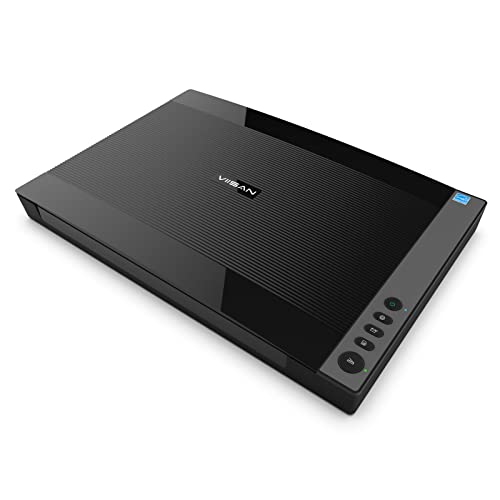
Best Large-Format Photo Scanner – VIISAN VF3120 A3
For archival collections containing albums, artwork, books, or oversized photographs, the VIISAN VF3120 offers a large A3 flatbed scanning area. It supports items up to 11.98 by 16.8 inches, uses a frameless design for thick materials, and provides up to 1200 x 1200 dpi optical resolution.
Best For: Libraries, schools, studios, and archivists scanning large photos, books, artwork, and other flat oversized materials.
Pros:
- A3-size bed handles items up to approximately 11.98 by 16.8 inches.
- 48-bit color depth supports detailed color gradients.
- Frameless, narrow-boundary design accommodates albums, books, and thick items.
- Auto-Scan and four-panel buttons can simplify repeated scanning tasks.
Cons:
- Its large 21.65-by-24.8-inch footprint requires substantial workspace.
- USB connection and a 24-watt power draw make it less portable than smaller models.
- The CIS sensor is intended for flat items, not three-dimensional objects.
The VF3120 is a sensible archival tool when standard letter-size scanning is not enough. Its large bed and high color depth are useful for oversized originals, though buyers should confirm they have room for the scanner and plan to use the supplied ViiScan software for 1200 dpi scans.
How We Picked the Best Photo Scanners for Archival Collections
We evaluated these scanners against the needs of real archival projects: image quality, scan speed, original handling, software features, connectivity, and versatility. Automatic document feeders can accelerate large collections, while flatbed designs are generally better suited to delicate, curled, mounted, or unusually shaped photographs. We also considered whether each model supports useful resolutions, color work, cropping, deskewing, and straightforward file management.
For archival work, advertised maximum resolution is only one consideration. Optical resolution, consistent focus, accurate color, dust reduction, and the ability to scan without stressing originals often matter more than an impressive specification alone.
Quick Comparison
| Best For | Recommended Type | Why It Fits |
|---|---|---|
| Large batches of loose photos | High-speed photo feeder | Automates feeding and can reduce hands-on scanning time |
| Fragile or valuable prints | Flatbed scanner | Offers controlled placement and gentle handling |
| Everyday mixed documents and photos | Duplex sheet-fed scanner | Combines convenience with fast document processing |
| Books, albums, or oversized originals | Large-format flatbed | Provides a larger scanning area and fewer stitching steps |
| Portable or space-limited setups | Compact USB or wireless model | Easy to store, move, and connect |
Key Buying Factors for Photo Scanners for Archival Collections
Resolution and Image Quality
A 600 dpi setting is usually sufficient for standard prints when creating digital copies, while higher optical resolution can help with cropping, enlargements, slides, or small originals. Look for accurate color reproduction and scan software that allows brightness, contrast, and color adjustments without forcing destructive edits.
Feeders Versus Flatbeds
Feeders are efficient for loose, clean, reasonably flat photographs. Flatbeds are safer for brittle, thin, curled, embossed, or irreplaceable items. If your collection includes albums or photographs attached to backing, prioritize a flatbed or large-format design.
Speed, Batch Features, and File Handling
Automatic cropping, deskewing, blank-page removal, and duplex scanning can save substantial time. Check the scanner’s actual batch capacity and whether its software supports sensible file naming, searchable folders, TIFF or high-quality JPEG output, and reliable backups.
Size, Connectivity, and Maintenance
Confirm that the scanning bed accepts your largest originals. Wireless connectivity is convenient, but USB may provide a simpler and more dependable archival workstation. Clean rollers and glass regularly, and avoid feeding photographs with loose surfaces, tears, or adhesive residue.
Who Should Buy Which Photo Scanners for Archival Collections?
Choose a high-speed photo feeder if you have hundreds or thousands of loose prints and value productivity. Choose a flatbed model if preservation, control, and broad compatibility matter more than throughput. A compact document scanner is a practical choice for mixed household paperwork and occasional photo work, while a large-format flatbed is best for albums, artwork, books, and oversized photographs. For especially valuable originals, prioritize gentle handling and consistent image quality over headline scanning speed.