If you want crisp initials, clean script, and consistent lettering, the right embroidery machine for monogramming makes all the difference. The best models balance easy setup, reliable design transfer, and a hoop size that matches the projects you actually make.
Below, we focus on beginner-friendly and value-packed options, plus a few larger-feature machines for makers who want more flexibility as their skills grow.
Best 10 Embroidery Machine for Monogramming Picks for 2026
Wireless Starter Pick
Brother PE545 Wireless Embroidery Machine

- Wireless LAN and USB design transfer
- 4" x 4" hoop with 3.7" touchscreen
- 135 designs and 10 fonts for personalization
Best For: Beginners and hobbyists focused on small monograms
Large-Hoop Monogramming Pick

- 7.9" x 7.9" max embroidery area
- 6 monogram fonts with 160 built-in designs
- Touchscreen editing plus USB design import
Best For: Users who want a larger field for detailed monograms
Wireless Large-Field Pick
Brother PE900 Wireless Embroidery Machine

- 5" x 7" hoop for larger monograms
- Wireless LAN plus Artspira mobile support
- 193 designs, 13 fonts, and stitch-trimming features
Best For: Users who want a bigger field with efficient workflow features
Compact Free-Arm Pick
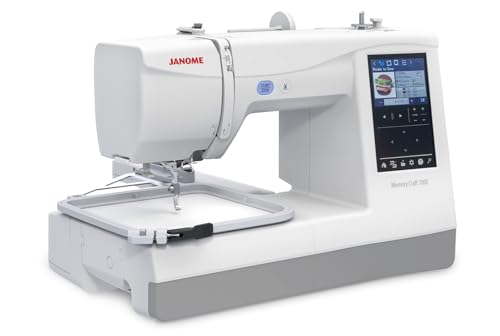
- 274 designs and 11+ fonts for monograms
- Optional free arm hoops for finished garments
- Lightweight 20 lb build with touchscreen editing
Best For: Crafters stitching monograms on shirts and finished garments
Beginner-Friendly Sewing Combo
Brother SE700 Sewing & Embroidery Machine

- 4" x 4" embroidery field with included hoop
- 135 built-in designs and 10 lettering fonts
- Wireless LAN plus USB file transfer
Best For: Beginners who want embroidery, monogramming, and sewing in one machine
Beginner Embroidery with Bigger Area
PooLin EOC03 Embroidery Machine

- Easy-to-use Institch system for beginners
- 4x4 and 4x9.25 embroidery areas
- 130 built-in designs, 8 fonts, WiFi transfer
Best For: New embroiderers who want simple controls and a flexible hoop size
Accessory-Rich Combo Pick
Brother SE700 Bundle with 40+ Accessories

- 4" x 4" combo sewing and embroidery machine
- 40+ accessories plus monogramming foot
- Artspira app support and iBroidery compatibility
Best For: Shoppers who want the SE700 with a larger accessory bundle
Compact Starter Pick
Brother Skitch Bluetooth Embroidery Machine

- 4" x 4" embroidery area for small monograms
- Bluetooth and Artspira app support
- Embroidery-only, compact desktop footprint
Best For: Beginners and small spaces
Best Combo for Larger Monograms
Brother SE1900 Sewing and Embroidery Machine

- 5" x 7" embroidery field for bigger monograms
- 11 embroidery fonts and 138 built-in designs
- 240 built-in stitches for sewing versatility
Best For: Shoppers wanting a larger combo machine
Best Bundle Value
Brother SE700 Combo Embroidery Machine Bundle

- Bundle includes hoops, thread, and accessories
- Monogramming foot and embroidery foot included
- Wireless LAN plus Artspira app support
Best For: Shoppers who want a bundled starter setup
Wireless Starter Pick – Brother PE545 Wireless Embroidery Machine
If you want an embroidery machine for monogramming that keeps the learning curve simple, the Brother PE545 is a practical place to start. It’s embroidery-only, has a 4″ x 4″ field, and gives you wireless file transfer plus a touchscreen for quick edits and previews.
Best For: Beginners and hobbyists who want wireless convenience, built-in fonts, and a compact hoop size for monograms and small designs.
Pros:
- Wireless LAN and USB transfer make it easy to move designs from a PC.
- 3.7″ color touchscreen supports drag-and-drop positioning and previewing.
- 135 built-in designs and 10 built-in fonts help you personalize projects.
- Includes a 4″ x 4″ hoop and accessory kit to get started.
Cons:
- Embroidery-only machine, so it won’t handle regular sewing.
- 4″ x 4″ field is better for smaller monograms than large designs.
- US 120V use only, per the product notes.
Overall, the PE545 is a straightforward choice if you mainly want to stitch names, initials, and compact decorative designs without paying for extra size or sewing functions you may not use.
Large-Hoop Monogramming Pick – Janome Memory Craft C400E
The Janome Memory Craft C400E is a strong embroidery machine for monogramming when you want more room to work and more built-in personalization tools. With a 7.9″ x 7.9″ maximum embroidery area, six monogram fonts, and on-screen editing, it’s built for more ambitious home embroidery projects.
Best For: Sewists who want a larger embroidery field, more monogram font choices, and flexible editing for detailed custom work.
Pros:
- Large 7.9″ x 7.9″ embroidery area supports bigger layouts.
- 160 built-in designs and 6 monogram fonts broaden personalization options.
- LCD color touchscreen lets you rotate, resize, mirror, and combine patterns.
- USB import and AcuStitch software support custom design use.
Cons:
- Embroidery-only machine, so it does not sew garments like a combo model.
- Larger footprint than compact beginner machines.
- More features may be more than casual users need.
If your priority is roomier stitching and more control over monogram layouts, the C400E stands out as a capable home embroidery machine with solid editing and import flexibility.
Wireless Large-Field Pick – Brother PE900 Wireless Embroidery Machine
For shoppers who want an embroidery machine for monogramming with more stitch space and smarter workflow features, the Brother PE900 is a compelling option. It pairs a 5″ x 7″ embroidery field with wireless transfer, built-in lettering fonts, and tools like color sort and jump stitch trimming.
Best For: Makers who want a larger hoop size for monograms and designs, plus wireless transfer and efficiency features.
Pros:
- 5″ x 7″ embroidery area is better for larger monograms and designs.
- Wireless LAN and Artspira support make file transfer and design creation easier.
- 193 built-in designs and 13 lettering fonts offer lots of variety.
- Color Sort and Jump Stitch Trimming help streamline multi-color stitching.
Cons:
- Embroidery-only machine, not a traditional sewing machine.
- May be more machine than users who only need tiny initials.
- US 120V-only use is noted by the manufacturer.
The PE900 is a smart step up if you want room to grow beyond basic initials and appreciate features that reduce interruptions during longer embroidery runs.
Compact Free-Arm Pick – Janome Memory Craft 100e
The Janome Memory Craft 100e is a compact embroidery machine for monogramming that focuses on personalization and finished-garment convenience. It includes 11+ fonts for 2- and 3-letter monograms, a 5.5″ x 5.5″ embroidery area, and optional free arm hoops for stitching on sleeves, cuffs, and other finished items.
Best For: Crafters who want a lightweight embroidery-only machine for shirts, clothes, and monograms on finished garments.
Pros:
- 274 built-in designs and 11+ fonts give you plenty of options.
- Optional free arm hoops help with cuffs, onesies, and pant legs.
- 3.5″ touchscreen supports resize, rotate, flip, duplicate, and combine functions.
- Optical bobbin monitoring and auto return help protect work during thread breaks.
Cons:
- 5.5″ x 5.5″ embroidery area is smaller than larger-field machines.
- Embroidery-only model, so it won’t replace a sewing machine.
- Best suited to monograms and smaller projects rather than oversized designs.
For users who want portability and smarter garment stitching, the 100e offers a balanced mix of monogramming fonts, editing tools, and free-arm flexibility.
Beginner-Friendly Sewing Combo – Brother SE700 Sewing & Embroidery Machine
If you want an embroidery machine for monogramming that can also handle everyday sewing, the Brother SE700 is a practical all-in-one pick. It pairs a 4″ x 4″ embroidery field with built-in lettering fonts, a touchscreen for editing, and wireless file transfer, making it a flexible starter machine for personalized projects.
Best For: Beginners who want to learn embroidery and monogramming on a combo machine with sewing features.
Pros:
- 135 built-in embroidery designs and 10 lettering fonts for personalization
- Wireless LAN and USB support for transferring embroidery files
- Includes a 4″ x 4″ hoop, embroidery arm, and 8 sewing feet
- 3.7″ color touchscreen for on-screen design editing and previewing
Cons:
- 4″ x 4″ embroidery area is best suited to smaller monogramming projects
- Requires 120V US use, which may limit international buyers
Overall, the SE700 is a strong choice if you want a straightforward embroidery machine for monogramming with helpful built-in designs and sewing versatility. Its beginner-friendly layout and wireless features make it easy to start customizing gifts and garments right away.
Beginner Embroidery with Bigger Area – PooLin EOC03 Embroidery Machine
The PooLin EOC03 is built for buyers who want an embroidery machine for monogramming without a steep learning curve. Its Institch system keeps controls simple, while the included 4×4 and 4×9.25 embroidery sizes give you more room to personalize shirts, towels, baby items, and gifts.
Best For: First-time users who want easy operation and more flexibility than a standard small hoop.
Pros:
- Beginner-friendly Institch system with simple navigation
- Two embroidery sizes: 4×4 and 4×9.25 inches
- 130 built-in designs and 8 fonts for immediate customization
- WiFi transfer and free software for creating custom patterns
Cons:
- Primarily focused on embroidery, not a sewing combo machine
- Some buyers may prefer a larger hoop for bigger designs
- Learning still requires time, even with tutorials and support
For beginners who value simplicity and a little extra embroidery space, the EOC03 is an appealing option. The included starter kit, tutorials, and one-on-one support make it especially approachable for monogramming at home.
Accessory-Rich Combo Pick – Brother SE700 Bundle with 40+ Accessories
Brother SE700 Combo Embroidery & Sewing Machine with 4" x 4" Embroidery Hoop and 40+ Accessories
Check Price On AmazonIf you’re shopping for an embroidery machine for monogramming and want a bundle with extra supplies, this Brother SE700 package stands out. It keeps the same 4″ x 4″ combo sewing and embroidery platform, but adds a long list of accessories plus Artspira design access for more customization options.
Best For: Buyers who want the SE700 platform with a bigger accessory bundle and extra design resources.
Pros:
- 135 built-in embroidery designs and 103 sewing stitches
- Includes 40+ accessories, plus embroidery frame and support items
- Wireless LAN enabled with Artspira app and iBroidery compatibility
- Monogramming foot included for personalized stitching projects
Cons:
- Still limited to a 4″ x 4″ embroidery hoop size
- Bundle adds value, but the machine itself remains compact and beginner-focused
This bundle makes sense if you want the SE700 experience but prefer to start with more tools in the box. It is a well-rounded choice for monogramming, especially for shoppers who want accessories, app support, and a ready-to-use setup.
Compact Starter Pick – Brother Skitch Bluetooth Embroidery Machine
If you want an embroidery machine for monogramming that keeps the learning curve simple, the Brother Skitch is built for quick personal projects. It offers a 4″ x 4″ embroidery area, speeds up to 400 stitches per minute, and works through the required Artspira app so you can draw, import designs, and start stitching without a bulky setup.
Best For: Beginners, small craft spaces, and shoppers who want an embroidery-only machine for customizing store-bought items.
Pros:
- 4″ x 4″ embroidery area fits names, initials, and small monogram-style designs.
- Bluetooth connection and Artspira app support make it easy to create or import designs.
- Compact footprint is well suited to a makeshift craft room or limited workspace.
- Includes starter accessories like a magnetic frame, bobbins, needles, and thread.
Cons:
- Embroidery-only design, so it does not function as a traditional sewing machine.
- Smaller hoop area limits larger monogram layouts and bigger design projects.
- Requires the Artspira app for operation and design workflows.
The Skitch makes sense if your priority is simple personalization rather than a full sewing setup. It is a practical entry point for monogramming shirts, towels, jeans, and blankets when you want a compact machine that stays focused on embroidery.
Best Combo for Larger Monograms – Brother SE1900 Sewing and Embroidery Machine
The Brother SE1900 is a strong choice if you want an embroidery machine for monogramming with more room to work. Its 5″ x 7″ embroidery field handles larger personalized designs, while 138 built-in designs and 11 embroidery fonts give you plenty of ways to create custom initials and names.
Best For: Buyers who want a versatile sewing-and-embroidery combo with a larger hoop area for monogram projects.
Pros:
- 5″ x 7″ embroidery field gives more space for larger monograms and custom layouts.
- 11 embroidery fonts are useful for names, initials, and personalization work.
- 240 built-in stitches add sewing versatility beyond embroidery.
- Large 3.2″ color touchscreen helps with previewing and editing designs.
Cons:
- Bulkier and heavier than a compact embroidery-only machine.
- More features may be more than needed if you only want basic monogramming.
- Designed for 120V US use only, so compatibility is limited.
If you want one machine that can handle both sewing and monogramming, the SE1900 is easy to justify. The larger embroidery area and built-in fonts make it better suited to more ambitious personalization projects than smaller entry-level machines.
Best Bundle Value – Brother SE700 Combo Embroidery Machine Bundle
The Brother SE700 bundle is a practical embroidery machine for monogramming if you want a ready-to-use package with helpful extras. It includes a 4″ x 4″ combo sewing and embroidery machine, multiple hoops, thread spools, and accessories, plus built-in wireless connectivity and embroidery design support through the Artspira app.
Best For: Buyers who want a bundled starter setup with accessories included for embroidery and light sewing.
Pros:
- Bundle includes multiple hoops, thread spools, and accessory items to get started sooner.
- Monogramming foot and embroidery foot are included in the package.
- Wireless LAN and Artspira app support add design flexibility.
- 135 built-in embroidery designs and 103 built-in sewing stitches cover common projects.
Cons:
- 4″ x 4″ embroidery area is smaller than larger combo machines.
- Bundle content may be more than needed if you already own hoops and thread.
- Not as spacious as a machine built around larger embroidery fields.
This bundle is appealing if you want to start monogramming with fewer extra purchases. The included hoops, thread, and feet make it a convenient setup for users who value accessories and a smaller, more manageable machine.
How We Picked the Best Embroidery Machine for Monogramming
We prioritized machines that handle lettering well, are easy to position accurately, and offer practical features for home use. That includes wireless or USB design transfer, clear controls, beginner-friendly threading and hooping, and enough built-in fonts or designs to make monogramming convenient out of the box.
We also looked at hoop sizes and stitch area, since monograms often require precise placement more than large design capacity. For shoppers comparing an Embroidery Machine for Monogramming, ease of learning and repeatable results matter as much as raw feature count.
Quick Comparison
Smaller 4" x 4" machines are a strong fit for initials on shirts, towels, gifts, and baby items. Larger embroidery fields, such as 5" x 7" or similar, give you more room for decorative letter combinations and bigger lettering layouts. Combo sewing-and-embroidery machines are best if you want one machine for both monograms and everyday garment work.
Key Buying Factors for an Embroidery Machine for Monogramming
Hoop Size and Placement
For monograms, a stable hoop and good on-screen alignment tools are essential. Smaller hoops are fine for classic initials, but a larger embroidery area gives you more layout freedom and fewer rehoops.
Fonts and Design Options
Look for machines with built-in monogram fonts, lettering styles, or easy import options. More font choices help you match formal, modern, or decorative projects without extra software.
Ease of Use
Automatic needle threading, touchscreen controls, simple menu navigation, and wireless file transfer all reduce setup time. These features are especially helpful if you are new to embroidery or making frequent custom gifts.
Stability and Everyday Workflow
A good machine should sew smoothly at modest speeds and keep lettering neat without constant adjustment. If you plan to embroider often, choose a model with dependable bobbin access, clear editing tools, and enough built-in memory for your usual designs.
Who Should Buy Which Embroidery Machine for Monogramming?
Beginners who want simple initials and small gifts should favor compact, easy-to-learn models. Crafters who expect to grow into larger lettering layouts should look for a bigger hoop area and more editing flexibility. If you also sew garments or home projects, a combo machine is the most versatile choice. For casual monogramming with a modern workflow, wireless-enabled models offer a very practical balance of convenience and control.