The best photo printers for scrapbooking make it easy to turn phone photos into finished embellishments, journal pages, labels, and keepsakes. The right model depends on whether you prioritize 4×6-inch prints, adhesive-backed mini photos, portability, or creative cutting features.
We compared these 10 options by print format, image quality, connectivity, running costs, portability, and included supplies so you can choose a printer that fits your scrapbook workflow.
Best 10 Photo Printers for Scrapbooking Picks for 2026
Best Starter Bundle

- Includes 100 sheets and three cartridges
- Laminated prints resist water, scratches, and fading
- App offers borders, filters, and image adjustments
Best For: Starting a scrapbook project with a ready-to-use supply bundle
Best for Stickers
Canon Ivy 2 Mini Photo Printer

- Creates 2x3-inch peel-and-stick prints
- Uses ink-free ZINK technology
- Connects by Bluetooth through a mobile app
Best For: Small adhesive photos and scrapbook embellishments
Best Docking Station
KODAK Dock Plus 4x6 Photo Printer
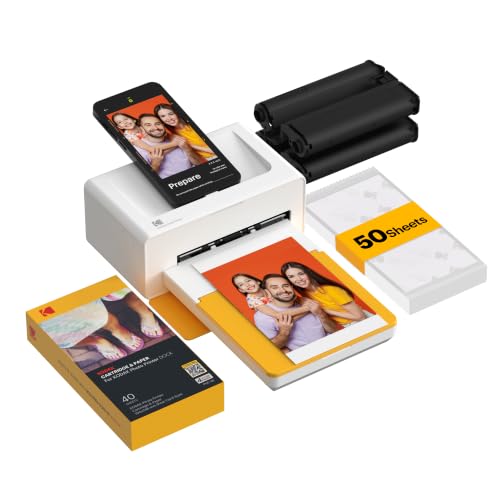
- Produces laminated 4x6-inch dye-sublimation prints
- Dock charges a compatible phone during printing
- App supports cropping, editing, and customization
Best For: Stable home printing of full-size scrapbook photos
Best All-in-One Pick

- Prints and cuts stickers in one workflow
- Includes 180 sheets across photo and sticker media
- Creates vivid, laminated 300 dpi prints
Best For: Scrapbookers making custom stickers and embellishments
Best Budget-Friendly Mini
KODAK Step Instant Photo Printer

- Portable design weighs less than a pound
- Prints peel-and-stick 2 x 3-inch photos
- App adds collages, borders, filters, and text
Best For: Small scrapbook accents and on-the-go journaling
Best for Photo Size Flexibility
Liene Amber M110 Photo Printer

- Supports 4 x 6-inch and 3 x 3-inch media
- Includes 80 sheets and two cartridges
- Produces laminated, fade-resistant dye-sublimation prints
Best For: Layouts mixing full-size photos and square stickers
Best Portable 4PASS Printer

- 4PASS prints have a protective laminated finish.
- Bluetooth app supports iOS and Android editing.
- Includes 38 sheets and four cartridges.
Best For: Durable, compact scrapbook prints from a smartphone
Best Creative Sticker Printer

- Prints colorful 2x3-inch adhesive photos.
- Includes 50 sticker sheets and five cartridges.
- App adds frames, stickers, and background removal.
Best For: Decorative scrapbook stickers and creative phone edits
Best Inkless Sticker Option

- Zink printing works without ink cartridges.
- Bundle includes 50 adhesive 2x3-inch sheets.
- Bluetooth 5.2 works without a Wi-Fi connection.
Best For: Simple peel-and-stick scrapbook photos on the go
Best Portable Pick – Canon Selphy CP1500
The Canon SELPHY CP1500 is a versatile choice among photo printers for scrapbooking when you want durable 4×6-inch photos, multiple connection options, and a compact design. Its dye-sublimation prints are water resistant, instantly dry, and available in several scrapbook-friendly sizes, including square, card-size, and mini-label formats.
Best For: Scrapbookers who want flexible media sizes, editing controls, and portable printing.
Pros:
- Prints dry, water-resistant photos designed to last up to 100 years.
- Supports Wi-Fi, USB, memory cards, smartphones, cameras, and USB flash drives.
- Offers 4×6-inch, square, card-size, and mini-label media options.
- Built-in 3.5-inch display supports image viewing, editing, and filter effects.
Cons:
- Maximum media size is 4×6 inches.
- The optional battery pack is needed for truly cordless use.
- Its 41-second initial print time may feel slow for large batches.
The CP1500 stands out for scrapbook projects that mix standard photos with smaller decorative prints. It is a strong all-around option if connection flexibility and long-lasting output matter more than borderless, large-format printing.
Best Starter Bundle – Liene M100 4×6 Photo Printer
The Liene M100 is a practical pick among photo printers for scrapbooking if you want to start printing immediately. It includes 100 sheets of 4×6-inch paper and three cartridges, while its laminated dye-sublimation prints resist water, scratches, fingerprints, and fading.
Best For: Scrapbookers who want an included paper-and-cartridge bundle for frequent 4×6 printing.
Pros:
- Includes 100 sheets of photo paper and three color cartridges.
- Produces vibrant, laminated 4×6-inch prints that resist common damage.
- Built-in Wi-Fi hotspot avoids the need for an outside network.
- App supports borders, filters, brightness and contrast adjustments, and ID-photo layouts.
Cons:
- It uses proprietary Liene cartridges.
- Print size is limited to 4×6 inches.
- The printer requires prompt print-head cleaning if smudges appear.
For scrapbookers planning a larger print session, the included supplies make the M100 especially convenient. Its app-based customization adds useful creative control, though ongoing media costs and the fixed 4×6 format should be considered.
Best for Stickers – Canon Ivy 2 Mini Photo Printer
The Canon Ivy 2 is one of the most convenient photo printers for scrapbooking when small embellishments matter. It creates 2×3-inch sticky-back prints from compatible iOS and Android devices, using ZINK paper with embedded dye crystals instead of ink cartridges.
Best For: Scrapbookers who want small peel-and-stick photos for decorating pages, planners, and crafts.
Pros:
- Peel-and-stick backing makes photos easy to place in scrapbook layouts.
- ZINK technology requires no ink cartridges.
- Bluetooth 5.0 supports mobile printing through the Canon Mini Print App.
- Compact, lightweight design weighs 145 grams.
Cons:
- Prints are limited to 2×3 inches.
- It works with compatible iOS and Android devices rather than offering broader connection options.
- The listed maximum sheet capacity is 10 sheets.
The Ivy 2 is best viewed as a creative add-on rather than a replacement for a full-size photo printer. Its adhesive-backed output is particularly useful for captions, small portraits, and layered scrapbook decorations.
Best Docking Station – KODAK Dock Plus 4×6 Photo Printer
The KODAK Dock Plus is a straightforward option among photo printers for scrapbooking, delivering detailed 4×6-inch photos from a smartphone. Its 4PASS dye-sublimation process applies three color layers and a protective laminate, while the docking station provides a stable desktop setup and can charge a phone during printing.
Best For: Home scrapbookers who prefer full-size 4×6 prints and a simple phone-docking workflow.
Pros:
- Produces 4×6-inch prints with a smooth, protective laminated finish.
- Prints are designed to resist fingerprints, water, and fading.
- Integrated docking station supports connection and phone charging during printing.
- KODAK app allows cropping, editing, and customization before printing.
Cons:
- It is designed for desktop, power-outlet use rather than battery-powered printing.
- Print size is limited to 4×6 inches.
- Bluetooth and docking are the listed connection methods, with no Wi-Fi listed.
The Dock Plus makes sense for a dedicated scrapbook workspace where reliable 4×6 output is the priority. Its simple setup and protective finish suit albums, framed photos, and everyday batch printing.
Best All-in-One Pick – Liene PixCut S1 Inspire Kit
For scrapbookers who want more than basic snapshots, the Liene PixCut S1 combines 300 dpi thermal dye-sublimation printing with one-step sticker cutting. Its Bluetooth app workflow lets you edit, print, and cut from a smartphone, making it a versatile choice among photo printers for scrapbooking.
Best For: Crafters who want to turn photos and AI-generated designs into durable custom stickers, labels, and scrapbook embellishments.
Pros:
- Prints and precision-cuts stickers in one streamlined workflow.
- AI image extraction helps isolate subjects and follow their edges.
- Includes 36 photo sheets and 144 sticker sheets.
- Laminated prints are described as waterproof and scratch-resistant.
Cons:
- At 2.9 kg, it is less portable than mini photo printers.
- The cutting and AI features depend on using the Liene app.
- Its all-in-one design may be more capability than simple photo printing requires.
The PixCut S1 is the strongest choice here for scrapbookers who value custom shapes and stickers as much as photo quality. Choose it if you want an integrated creative workstation rather than a pocket-sized printer.
Best Budget-Friendly Mini – KODAK Step Instant Photo Printer
The KODAK Step is a compact option for scrapbookers who want quick, peel-and-stick 2 x 3-inch prints. With Bluetooth or NFC connectivity, a mobile editing app, and ink-free ZINK paper, it is an easy entry point among photo printers for scrapbooking.
Best For: Portable journaling and scrapbook projects that use small snapshots, labels, and decorative photo accents.
Pros:
- Small, lightweight design weighs less than a pound.
- Sticky-back ZINK prints are resistant to moisture, rips, tears, and smudges.
- The app supports collages, filters, borders, stickers, and text.
- Built-in rechargeable battery prints up to 25 photos per charge.
Cons:
- Prints are limited to the smaller 2 x 3-inch format.
- The listed paper capacity is 10 sheets.
- It is designed for print-only use rather than cutting or larger photos.
The KODAK Step makes sense when portability and simple adhesive prints matter most. Its small format is convenient for layering into scrapbook pages, though it is less suitable for prominent 4 x 6-inch photos.
Best for Photo Size Flexibility – Liene Amber M110 Photo Printer
The Liene Amber M110 gives scrapbookers two useful media choices: standard 4 x 6-inch photos and 3 x 3-inch sticky-backed prints. Its dual-tray design and thermal dye-sublimation process make it a flexible middle ground among photo printers for scrapbooking.
Best For: Crafters who alternate between full-size photo layouts and smaller adhesive embellishments.
Pros:
- Dual trays support both 4 x 6-inch and 3 x 3-inch media.
- Includes 60 4 x 6-inch sheets, 20 square sticker sheets, and two cartridges.
- Laminated prints resist water, scratches, fingerprints, and fading.
- Bluetooth pairing is advertised at approximately 13 seconds.
Cons:
- It only supports Liene-compatible 4 x 6-inch and 3 x 3-inch cartridges.
- At 2.9 pounds, it is less pocketable than the KODAK Step.
- It does not provide integrated sticker cutting.
The Amber M110 is a practical choice when scrapbook layouts vary in scale. It offers more flexibility than a mini printer while retaining a compact, app-controlled workflow for both photos and adhesive squares.
Best Portable 4PASS Printer – Kodak Mini 2 Retro
The KODAK Mini 2 Retro is a practical choice for anyone seeking photo printers for scrapbooking that produce compact, polished prints without a desktop setup. Its Bluetooth connection, mobile app, and credit-card-sized 4PASS prints make it convenient for albums, planners, and journaling projects.
Best For: Scrapbookers who want durable, glossy 2.1 x 3.4-inch prints from a smartphone.
Pros:
- 4PASS dye-sublimation printing adds a protective, anti-fingerprint, water-resistant finish.
- Portable design connects to iOS and Android devices through Bluetooth.
- Bundle includes 38 sheets and four cartridges for immediate printing.
- The app supports editing, cropping, and customization before printing.
Cons:
- Prints are limited to a compact 2.1 x 3.4-inch size.
- Printing takes approximately 55 seconds per photo.
- It prints through the KODAK app rather than directly from general phone functions.
Choose this model if print finish and photo longevity matter more than larger formats. The included supplies and straightforward Bluetooth setup also make it a convenient starter option for scrapbook projects.
Best Creative Sticker Printer – Liene Pearl N200 Pro
The Liene Pearl N200 Pro stands out among photo printers for scrapbooking because it combines 2×3-inch dye-sublimation photos with adhesive paper and creative app tools. It is designed for scrapbookers who want sticker-style prints, decorative borders, and quick personalization from a phone.
Best For: Creative scrapbookers who want adhesive photos, frames, stickers, and AI-assisted editing options.
Pros:
- Uses dye-sublimation printing at 300 x 300 dpi for colorful 2×3-inch photos.
- Includes 50 sheets of adhesive paper and five cartridges.
- App offers frames, stickers, timestamps, watermarks, and background removal.
- Supports one-touch shoot-and-print mode and multi-device pairing.
Cons:
- A full charge prints up to 27 stickers, which may require frequent recharging for large projects.
- The compact 2×3-inch format may not suit larger scrapbook layouts.
- Creative features depend on using the Liene Photo App.
This is a strong fit when scrapbook embellishment is as important as the photo itself. The adhesive media and built-in creative tools reduce the need for separate glue, labels, and basic editing apps.
Best Inkless Sticker Option – Liene Pearl K100
The Liene Pearl K100 is a compact option for photo printers for scrapbooking, especially when you want peel-and-stick 2×3-inch images. Its Zink inkless technology, Bluetooth 5.2 connection, and included 50-sheet paper bundle make it easy to create small scrapbook accents from iOS or Android devices.
Best For: Mobile scrapbookers who prefer inkless, adhesive prints for quick decorating and labeling.
Pros:
- Zink inkless printing avoids separate ink cartridges.
- Includes 50 sheets of 2×3-inch sticky-backed photo paper.
- Bluetooth 5.2 enables wireless printing without Wi-Fi.
- One charge can print up to 30 photos, according to the supplied notes.
Cons:
- Photos can only be printed through the Liene app.
- The 2×3-inch format is intended for small images and embellishments.
- Cleaning the print head requires a blue calibration card.
The K100 is a convenient choice for users who want simple, adhesive scrapbook photos without managing cartridges. Its small size and wireless operation work well for travel, parties, and quick creative sessions.
How We Picked the Best Photo Printers for Scrapbooking
We focused on the features that matter most in real scrapbooking projects: print size, color quality, paper format, ease of use, portability, and creative flexibility. The lineup includes dye-sublimation printers for detailed, durable photos; ZINK models that print without ink cartridges; and multifunction options that can cut stickers or create other embellishments.
We also considered how each printer connects to a phone, what supplies come in the box, and whether its format suits full-page layouts, pocket pages, cards, or small decorative accents. Because ongoing paper costs can affect the value more than the initial price, replacement media is an important part of the comparison.
Quick Comparison
| Best For | Recommended Format | What to Look For |
|---|---|---|
| Traditional scrapbook layouts | 4×6-inch prints | Accurate color, border options, and affordable paper packs |
| Small accents and captions | 2×3-inch prints | Compact size, adhesive paper, and simple mobile editing |
| Sticker-style embellishments | Sticky-back or ZINK media | Peel-and-stick convenience and clean edges |
| Crafting beyond photos | Cuttable sticker media | Integrated cutting tools and design software |
Key Buying Factors for Photo Printers for Scrapbooking
Print Size and Layout Compatibility
Choose 4×6-inch printing if you build traditional pages or want photos large enough to serve as focal points. Mini 2×3-inch printers are better for borders, collages, planners, and small pockets. Some compact models offer different media sizes, which can be useful if your projects vary.
Print Technology and Appearance
Dye-sublimation printers generally produce smooth, detailed color and often add a protective finish. ZINK printers are convenient because they use special paper instead of ink cartridges, but their small format and image character may suit decorative snapshots better than formal portraits. Check whether the companion app supports cropping, filters, borders, collages, and ID-style layouts.
Adhesive Paper and Supply Costs
Sticky-back paper saves time when you are adding photos directly to pages, while standard prints give you more flexibility with photo corners, tape, or repositionable adhesive. Compare the cost per print of replacement paper and cartridges, not just the included bundle.
Connectivity and Portability
Bluetooth and Wi-Fi printing are convenient for phone-based workflows. A portable battery-powered model works well for crops, classes, and travel, while a larger docked printer may be preferable for a dedicated craft space. Also consider app compatibility with your phone and tablet.
Who Should Buy Which Photo Printers for Scrapbooking?
Choose a 4×6-inch dye-sublimation model if photo quality and classic scrapbook proportions matter most. Pick a mini adhesive printer if you want quick labels, accents, and casual snapshots with minimal setup. A ZINK printer is a practical choice for ink-free convenience and highly portable projects. If you want to design and cut custom stickers as well as print photos, an all-in-one printer-and-cutter kit offers the broadest creative range.
Before buying, confirm the required app, supported devices, paper availability, and replacement-media price. The best photo printer for your scrapbook is the one whose print size, supplies, and workflow match how you actually create.